I have added multilingual support to Envy’s next release, which is still under development, but so far I have added only the support for the Italian language as regards, the GUI. The textual installer will remain in English (at least in next release).
What can you do to help?
1) First of all install gettext:
sudo apt-get install gettext
2) download this file in you home folder.
3) Now there are two ways you can follow this step.
If your Operating System is localised in the language into which you’re planning to translate Envy (e.g. you want to translate Envy into Spanish and your OS is in Spanish) you can simply type this command:
msginit --input=envy.pot
Otherwise, if (like me) you’re using your OS in another language (I’m Italian but my Ubuntu is in English) you will have to type:
msginit --input=envy.pot --locale=the_desired_locale
Of course you will have to replace “the_desired_locale” with the language into which you want to translate Envy. For example if you want to translate it into Spanish you will have to put “ES” (so that it looks like this: “msginit –input=envy.pot –locale=ES”)
then you will be asked to enter your email address (and no, I won’t spam you 😉 ) and you will have your .po file (e.g. “es.po”)
4) you will have to translate a few lines just as I did in this example. The “msgid” contains the original text string while the “msgstr” is where you will have to put the translated string.
5) Remember to put your name in the msgstr related to the “translator-credits” msgid in your po file.
#: ../envyui/gtkenvy.glade.h:25

msgid "translator-credits"

msgstr "Alberto Milone"
6) Upload your .po file here:
NOTE: if you can’t upload the .po file you can email me the file:
[ you can find my email address on my website: http://www.albertomilone.com/ ]
And here is the result:
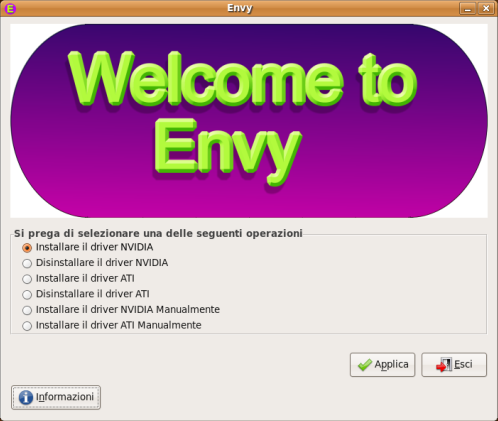
EDIT: so far I have received translations into:
Russian, French, Finnish, German, Spanish (Spain), Spanish (Chile), Italian, Turkish, Dutch, Brazilian Portuguese, Portuguese, Austrian, Polish, Amharic (Ethiopian), Serbian, Slovak
NOTE: you can see which translations are already available here
Why not use rosetta? You will get much more contributions.
Do you have the french language file?
Or… you use Launchpad.
OT: Does envy have a way for enabling compiz on updated ati cards (actually, frglx isn’t on the ubuntu-compiz white list, but the next envy drivers should support compiz).
David
There you go with russian translation. note, its in UTF-8, not ASCII as mentioned in file. And yeah… put your mail into blog post, its not that easy to find it… you know… three clicks! 🙂
“4) you will have to translate a few lines just as I did in this example”
Page Not Found
Cheers
José Tadeu
Brasil
@José Tadeu
Problem solved, thanks for reporting.
@all
so far I have received translations into:
Russian, French, German
For some reason, I cannot upload my translation: I get a “Forbidden” error. By the way, how do you “review” a translation? Because The Russian translation has a lot of mistakes, I would like to correct those…
@Nicholas yeah, thats possible. i completed it in half an hour and it was my first translation for open source project 🙂
btw, i didnt tried to make exact literal translation, but just make it sounds natural for russian speakers.
I’ve translated to polish but I can’t uplaod file! I’ve got message:
Not allowed here
Sorry, you don’t have permission to access this page.
You are logged in as Gregg.
???
I have made a Dutch translation file, but the link to the upload page gives the message “Forbidden”. So I uploaded it to http://alexandervanhoorn.nl/NL.po .
@all
if you can’t upload the .po file you can send it to me via email
NOTE: you can find my email address on my website:
http://www.albertomilone.com/
I’ve completed Turkish translation. When i see this information page, upload page was working but now it says “Sorry, you don’t have permission to access this page.”
I think this is just a temporary error. At least i hope it is so.
Ok, sorry, i see the e-mail information now. Please ignore my comments.
Intanto complimenti per ciò che fai:) sei davvero molto competente.
Volevo domandarti se rilasciare l’aggiornamento per i nuovi driver ati, gli 8.42.3 del tuo programma:) e se c’è un modo per cambiare semplicemnete il link da dove scarica i driver…
Ciao e grazie
I would like to install Ubuntu 7.10 with catalyst 8.42 this weekend, will you put the new version of envy Saturday?
I’ve done my homework xD… Spanish translation are ready!
Thanx for your Envy. citando uno spot: “C’è più gusto ad essere italiani”
I’m translating Envy to Finnish. Before I upload my translation I would like to test it in my own computer.
Because I’m not too familiar with linux yet, I don’t know how to test it.
So would someone please help me!
Hi
I have translated the DK.po into danish, but I mis one line. The word ‘dependency’ (afhængighed) doesn’t really make any sense in danish. What kind of dependency is it? Files missing?
@Bjerrum
you can translate it with “packages” (which is more generic).
@mts-fi
Sorry, but a Finnish translation is already available. If you want to review it you can send me an email and I’ll give you the file.