This new release of URandR will finally allow you to save your settings without touching your xorg.conf (except for the virtual resolution).
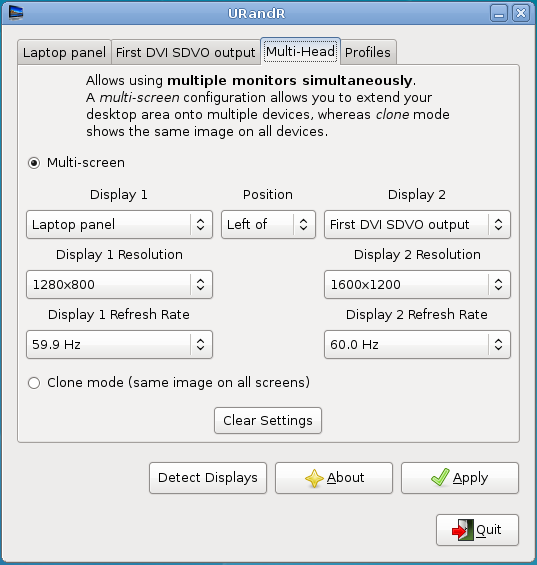
URandR can now check if you’re using independent screens or cloned screens as you can see in the following screenshot:
Furthermore you can now save your current settings to a profile. Currently there are four profiles which you can use to store your settings (home, office, conference, other). You might wonder what you can do with such profiles?
1) you can save your settings to a profile (e.g. your DVI screen is set to a resolution of 1600×1200 and is to the left of your laptop screen) and load them whenever you want without having to set the resolution and screen position every time.
2) you can choose to set a profile by default. so that when you enter your desktop your screens will be configured exactly as you want, without having to use URandR every time.
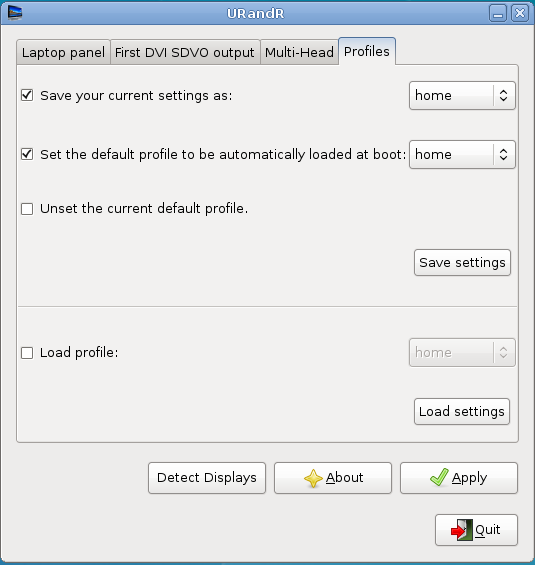
URandR doesn’t write your settings to the xorg.conf but uses profiles. Profiles are scripts containing all your settings. If you set a profile as the default profile, such script will be executed every time you enter a desktop session.
NOTES:
1) Only GNOME, KDE, XFCE are supported (therefore setting a default profile might not work with other desktop environments).
2) Only two screens are supported.
3) Your graphic driver must support RandR 1.2
4) The new packaging scripts will make URandR easy to install on Debian (thanks to Cyril Brulebois).
5) You will find URandR in the System/Preferences menu in GNOME and in the Settings menu in KDE.
You can get URandR here.
Constructive criticism is welcome.
P.S. Yes, I will give you a version of Envy with Nvidia’s beta driver before Christmas.
EDIT: Thanks to Alex Launi now URandR works well with ldap
great job, thanks!
Is there some technical reason for not including more than two screens?
@*daniel
yes, have a look at this page:
http://wiki.debian.org/XStrikeForce/HowToRandR12
congrats on the new release. urandr looks pretty sweet, keep up the good work.
I would really like if during the process Envy could automaticaly enable AIXGL.
Thanks in advance, it would be very appreciated.
Cygoku
P.S.: Thanks for your last advice, it worked perfectly.
Dear Alberto
Thanks for ENVY, I have 1st version of Envy 0.9.9 installed, so should I keep updating this?
Because I see you Have a new Envy 0.9.9 ubuntu2 out now, so should I download and update?
thanks
ps: by the way I have huge problems with video (just black screens) no real performance gain, suspend hibernate does not work.
DELL Inspiron 6400/1505e, 2 GB Ram, Intel CoreDuo T2500 @ 2.00GHz
ATi X1400 (1680×1050 widescreen) 128MB, Intel 3945 PRO/Wireless
120GB (partitioned:sda1 /, sda2 /home, “sda3 /windows” & 1.5GB Swap)
@Mozart
1) what do you mean by “black screens”?
2) can you post the output of this command?
glxinfo
Hello Alberto
(I have posted an example video of the flickering here)
Please Help! – Video flickers like crazy – what can I do?
http://ubuntuforums.org/showthread.php?t=635760
Compiz enabled, now intense flicker in Videos, watching photo and Google Earth
http://ubuntuforums.org/showthread.php?t=637175
The two links on the top are the posts I started to fix my problem with the black video when watching a movie.
=======
ok, i did the glxinfo you asked me for, but it’s a long one I hope it’s ok to post here, otherwise i can make a post at ubuntuforums.org and then post the link here.
mozart@network:~$ glxinfo
name of display: :0.0
display: :0 screen: 0
direct rendering: Yes
server glx vendor string: SGI
server glx version string: 1.2
server glx extensions:
GLX_ARB_multisample, GLX_EXT_import_context, GLX_EXT_texture_from_pixmap,
GLX_EXT_visual_info, GLX_EXT_visual_rating, GLX_OML_swap_method,
GLX_SGIS_multisample, GLX_SGIX_fbconfig, GLX_SGIX_visual_select_group
client glx vendor string: SGI
client glx version string: 1.4
client glx extensions:
GLX_ARB_get_proc_address, GLX_ARB_multisample, GLX_EXT_import_context,
GLX_EXT_visual_info, GLX_EXT_visual_rating, GLX_MESA_allocate_memory,
GLX_MESA_copy_sub_buffer, GLX_MESA_swap_control,
GLX_MESA_swap_frame_usage, GLX_OML_swap_method, GLX_OML_sync_control,
GLX_SGI_make_current_read, GLX_SGI_swap_control, GLX_SGI_video_sync,
GLX_SGIS_multisample, GLX_SGIX_fbconfig, GLX_SGIX_pbuffer,
GLX_SGIX_visual_select_group, GLX_EXT_texture_from_pixmap
GLX version: 1.2
GLX extensions:
GLX_ARB_get_proc_address, GLX_ARB_multisample, GLX_EXT_import_context,
GLX_EXT_visual_info, GLX_EXT_visual_rating, GLX_OML_swap_method,
GLX_SGIS_multisample, GLX_SGIX_fbconfig, GLX_SGIX_visual_select_group
OpenGL vendor string: ATI Technologies Inc.
OpenGL renderer string: ATI Mobility Radeon X1400
OpenGL version string: 2.1.7059 Release
OpenGL extensions:
GL_AMD_performance_monitor, GL_ARB_depth_texture, GL_ARB_draw_buffers,
GL_ARB_fragment_program, GL_ARB_fragment_shader, GL_ARB_multisample,
GL_ARB_multitexture, GL_ARB_occlusion_query, GL_ARB_pixel_buffer_object,
GL_ARB_point_parameters, GL_ARB_point_sprite, GL_ARB_shader_objects,
GL_ARB_shading_language_100, GL_ARB_shadow, GL_ARB_shadow_ambient,
GL_ARB_texture_border_clamp, GL_ARB_texture_compression,
GL_ARB_texture_cube_map, GL_ARB_texture_env_add,
GL_ARB_texture_env_combine, GL_ARB_texture_env_crossbar,
GL_ARB_texture_env_dot3, GL_ARB_texture_float,
GL_ARB_texture_mirrored_repeat, GL_ARB_texture_rectangle,
GL_ARB_transpose_matrix, GL_ARB_vertex_buffer_object,
GL_ARB_vertex_program, GL_ARB_vertex_shader, GL_ARB_window_pos,
GL_ATI_draw_buffers, GL_ATI_envmap_bumpmap, GL_ATI_fragment_shader,
GL_ATI_meminfo, GL_ATI_separate_stencil, GL_ATI_texture_compression_3dc,
GL_ATI_texture_env_combine3, GL_ATI_texture_float, GL_EXT_bgra,
GL_EXT_blend_color, GL_EXT_blend_func_separate, GL_EXT_blend_minmax,
GL_EXT_blend_subtract, GL_EXT_compiled_vertex_array, GL_EXT_copy_texture,
GL_EXT_draw_range_elements, GL_EXT_fog_coord, GL_EXT_framebuffer_object,
GL_EXT_gpu_program_parameters, GL_EXT_multi_draw_arrays,
GL_EXT_packed_depth_stencil, GL_EXT_packed_pixels,
GL_EXT_point_parameters, GL_EXT_rescale_normal, GL_EXT_secondary_color,
GL_EXT_separate_specular_color, GL_EXT_shadow_funcs, GL_EXT_stencil_wrap,
GL_EXT_subtexture, GL_EXT_texgen_reflection, GL_EXT_texture3D,
GL_EXT_texture_compression_s3tc, GL_EXT_texture_cube_map,
GL_EXT_texture_edge_clamp, GL_EXT_texture_env_add,
GL_EXT_texture_env_combine, GL_EXT_texture_env_dot3,
GL_EXT_texture_filter_anisotropic, GL_EXT_texture_lod_bias,
GL_EXT_texture_mirror_clamp, GL_EXT_texture_object,
GL_EXT_texture_rectangle, GL_EXT_texture_sRGB, GL_EXT_vertex_array,
GL_KTX_buffer_region, GL_NV_blend_square, GL_NV_texgen_reflection,
GL_SGIS_generate_mipmap, GL_SGIS_texture_edge_clamp, GL_SGIS_texture_lod,
GL_WIN_swap_hint, WGL_EXT_swap_control
visual x bf lv rg d st colorbuffer ax dp st accumbuffer ms cav
id dep cl sp sz l ci b ro r g b a bf th cl r g b a ns b eat
———————————————————————-
0x23 24 tc 0 32 0 r y . 8 8 8 8 0 24 8 16 16 16 16 0 0 None
0x24 24 tc 0 32 0 r . . 8 8 8 8 0 24 8 16 16 16 16 0 0 None
0x25 24 tc 0 32 0 r y . 8 8 8 8 0 24 0 16 16 16 16 0 0 None
0x26 24 tc 0 32 0 r . . 8 8 8 8 0 24 0 16 16 16 16 0 0 None
0x27 24 tc 0 32 0 r y . 8 8 8 8 0 24 8 0 0 0 0 0 0 None
0x28 24 tc 0 32 0 r . . 8 8 8 8 0 24 8 0 0 0 0 0 0 None
0x29 24 tc 0 32 0 r y . 8 8 8 8 0 24 0 0 0 0 0 0 0 None
0x2a 24 tc 0 32 0 r . . 8 8 8 8 0 24 0 0 0 0 0 0 0 None
0x2b 24 tc 0 32 0 r y . 8 8 8 8 0 24 8 16 16 16 16 0 0 None
0x2c 24 tc 0 32 0 r . . 8 8 8 8 0 24 8 16 16 16 16 0 0 None
0x2d 24 tc 0 32 0 r y . 8 8 8 8 0 24 0 16 16 16 16 0 0 None
0x2e 24 tc 0 32 0 r . . 8 8 8 8 0 24 0 16 16 16 16 0 0 None
0x2f 24 tc 0 32 0 r y . 8 8 8 8 0 24 8 0 0 0 0 0 0 None
0x30 24 tc 0 32 0 r . . 8 8 8 8 0 24 8 0 0 0 0 0 0 None
0x31 24 tc 0 32 0 r y . 8 8 8 8 0 24 0 0 0 0 0 0 0 None
0x32 24 tc 0 32 0 r . . 8 8 8 8 0 24 0 0 0 0 0 0 0 None
0x33 24 tc 0 32 0 r y . 8 8 8 8 0 24 8 16 16 16 16 0 0 None
0x34 24 tc 0 32 0 r . . 8 8 8 8 0 24 8 16 16 16 16 0 0 None
0x35 24 tc 0 32 0 r y . 8 8 8 8 0 24 0 16 16 16 16 0 0 None
0x36 24 tc 0 32 0 r . . 8 8 8 8 0 24 0 16 16 16 16 0 0 None
0x37 24 tc 0 32 0 r y . 8 8 8 8 0 24 8 0 0 0 0 0 0 None
0x38 24 tc 0 32 0 r . . 8 8 8 8 0 24 8 0 0 0 0 0 0 None
0x39 24 tc 0 32 0 r y . 8 8 8 8 0 24 0 0 0 0 0 0 0 None
0x3a 24 tc 0 32 0 r . . 8 8 8 8 0 24 0 0 0 0 0 0 0 None
0x3b 24 tc 0 32 0 r y . 8 8 8 8 0 24 8 16 16 16 16 0 0 None
0x3c 24 tc 0 32 0 r . . 8 8 8 8 0 24 8 16 16 16 16 0 0 None
0x3d 24 tc 0 32 0 r y . 8 8 8 8 0 24 0 16 16 16 16 0 0 None
0x3e 24 tc 0 32 0 r . . 8 8 8 8 0 24 0 16 16 16 16 0 0 None
0x3f 24 tc 0 32 0 r y . 8 8 8 8 0 24 8 0 0 0 0 0 0 None
0x40 24 tc 0 32 0 r . . 8 8 8 8 0 24 8 0 0 0 0 0 0 None
0x41 24 tc 0 32 0 r y . 8 8 8 8 0 24 0 0 0 0 0 0 0 None
0x42 24 tc 0 32 0 r . . 8 8 8 8 0 24 0 0 0 0 0 0 0 None
0x43 24 tc 0 32 0 r y . 8 8 8 8 0 24 8 16 16 16 16 0 0 None
0x44 24 tc 0 32 0 r . . 8 8 8 8 0 24 8 16 16 16 16 0 0 None
0x45 24 tc 0 32 0 r y . 8 8 8 8 0 24 0 16 16 16 16 0 0 None
0x46 24 tc 0 32 0 r . . 8 8 8 8 0 24 0 16 16 16 16 0 0 None
0x47 24 tc 1 0 0 c . . 0 0 0 0 0 0 0 0 0 0 0 0 0 None
0x48 24 tc 1 0 0 c . . 0 0 0 0 0 0 0 0 0 0 0 0 0 None
0x49 24 tc 1 0 0 c . . 0 0 0 0 0 0 0 0 0 0 0 0 0 None
0x4a 24 tc 1 0 0 c . . 0 0 0 0 0 0 0 0 0 0 0 0 0 None
0x4b 24 dc 0 32 0 r y . 8 8 8 8 0 24 8 16 16 16 16 0 0 None
0x4c 24 dc 0 32 0 r . . 8 8 8 8 0 24 8 16 16 16 16 0 0 None
0x4d 24 dc 0 32 0 r y . 8 8 8 8 0 24 0 16 16 16 16 0 0 None
0x4e 24 dc 0 32 0 r . . 8 8 8 8 0 24 0 16 16 16 16 0 0 None
0x4f 24 dc 0 32 0 r y . 8 8 8 8 0 24 8 0 0 0 0 0 0 None
0x50 24 dc 0 32 0 r . . 8 8 8 8 0 24 8 0 0 0 0 0 0 None
0x51 24 dc 0 32 0 r y . 8 8 8 8 0 24 0 0 0 0 0 0 0 None
0x52 24 dc 0 32 0 r . . 8 8 8 8 0 24 0 0 0 0 0 0 0 None
0x53 24 dc 0 32 0 r y . 8 8 8 8 0 24 8 16 16 16 16 0 0 None
0x54 24 dc 0 32 0 r . . 8 8 8 8 0 24 8 16 16 16 16 0 0 None
0x55 24 dc 0 32 0 r y . 8 8 8 8 0 24 0 16 16 16 16 0 0 None
0x56 24 dc 0 32 0 r . . 8 8 8 8 0 24 0 16 16 16 16 0 0 None
0x57 24 dc 0 32 0 r y . 8 8 8 8 0 24 8 0 0 0 0 0 0 None
0x58 24 dc 0 32 0 r . . 8 8 8 8 0 24 8 0 0 0 0 0 0 None
0x59 24 dc 0 32 0 r y . 8 8 8 8 0 24 0 0 0 0 0 0 0 None
0x5a 24 dc 0 32 0 r . . 8 8 8 8 0 24 0 0 0 0 0 0 0 None
0x5b 24 dc 0 32 0 r y . 8 8 8 8 0 24 8 16 16 16 16 0 0 None
0x5c 24 dc 0 32 0 r . . 8 8 8 8 0 24 8 16 16 16 16 0 0 None
0x5d 24 dc 0 32 0 r y . 8 8 8 8 0 24 0 16 16 16 16 0 0 None
0x5e 24 dc 0 32 0 r . . 8 8 8 8 0 24 0 16 16 16 16 0 0 None
0x5f 24 dc 0 32 0 r y . 8 8 8 8 0 24 8 0 0 0 0 0 0 None
0x60 24 dc 0 32 0 r . . 8 8 8 8 0 24 8 0 0 0 0 0 0 None
0x61 24 dc 0 32 0 r y . 8 8 8 8 0 24 0 0 0 0 0 0 0 None
0x62 24 dc 0 32 0 r . . 8 8 8 8 0 24 0 0 0 0 0 0 0 None
0x63 24 dc 0 32 0 r y . 8 8 8 8 0 24 8 16 16 16 16 0 0 None
0x64 24 dc 0 32 0 r . . 8 8 8 8 0 24 8 16 16 16 16 0 0 None
0x65 24 dc 0 32 0 r y . 8 8 8 8 0 24 0 16 16 16 16 0 0 None
0x66 24 dc 0 32 0 r . . 8 8 8 8 0 24 0 16 16 16 16 0 0 None
0x67 24 dc 0 32 0 r y . 8 8 8 8 0 24 8 0 0 0 0 0 0 None
0x68 24 dc 0 32 0 r . . 8 8 8 8 0 24 8 0 0 0 0 0 0 None
0x69 24 dc 0 32 0 r y . 8 8 8 8 0 24 0 0 0 0 0 0 0 None
0x6a 24 dc 0 32 0 r . . 8 8 8 8 0 24 0 0 0 0 0 0 0 None
0x6b 24 dc 0 32 0 r y . 8 8 8 8 0 24 8 16 16 16 16 0 0 None
0x6c 24 dc 0 32 0 r . . 8 8 8 8 0 24 8 16 16 16 16 0 0 None
0x6d 24 dc 0 32 0 r y . 8 8 8 8 0 24 0 16 16 16 16 0 0 None
0x6e 24 dc 0 32 0 r . . 8 8 8 8 0 24 0 16 16 16 16 0 0 None
0x6f 24 dc 1 0 0 c . . 0 0 0 0 0 0 0 0 0 0 0 0 0 None
0x70 24 dc 1 0 0 c . . 0 0 0 0 0 0 0 0 0 0 0 0 0 None
0x71 24 dc 1 0 0 c . . 0 0 0 0 0 0 0 0 0 0 0 0 0 None
0x72 24 dc 1 0 0 c . . 0 0 0 0 0 0 0 0 0 0 0 0 0 None
0x88 32 tc 0 32 0 r . . 8 8 8 8 0 0 0 0 0 0 0 0 0 Ncon
Grandissimo… meglio di Babbo Natale 😀
http://www.phoronix.com/scan.php?page=article&item=946&num=1
Looks like stable 169.07 is out! No need to rls the beta version now 😀
thanks a lot
Thanx for the tool! Really usefull!
Would it be possible to choose the profile’s name and have as many as one wants?
Thanx again!